ASU Walter Cronkite School of Journalism
Christopher Campbell
Jamf Pro Admin
Jamf-certified administrator managing hundreds of Apple devices across campus. I also manage the AV technology behind lecture halls, classrooms, conference rooms, and event spaces. Around ASU, I'm known as the AV Guru.
- Years at ASU Cronkite
- 17+
- Apple devices managed
- 500+
- Industry certifications
- 10
- Campus locations supported
- 3
About
Systems Support Principal & Audio-Visual Manager
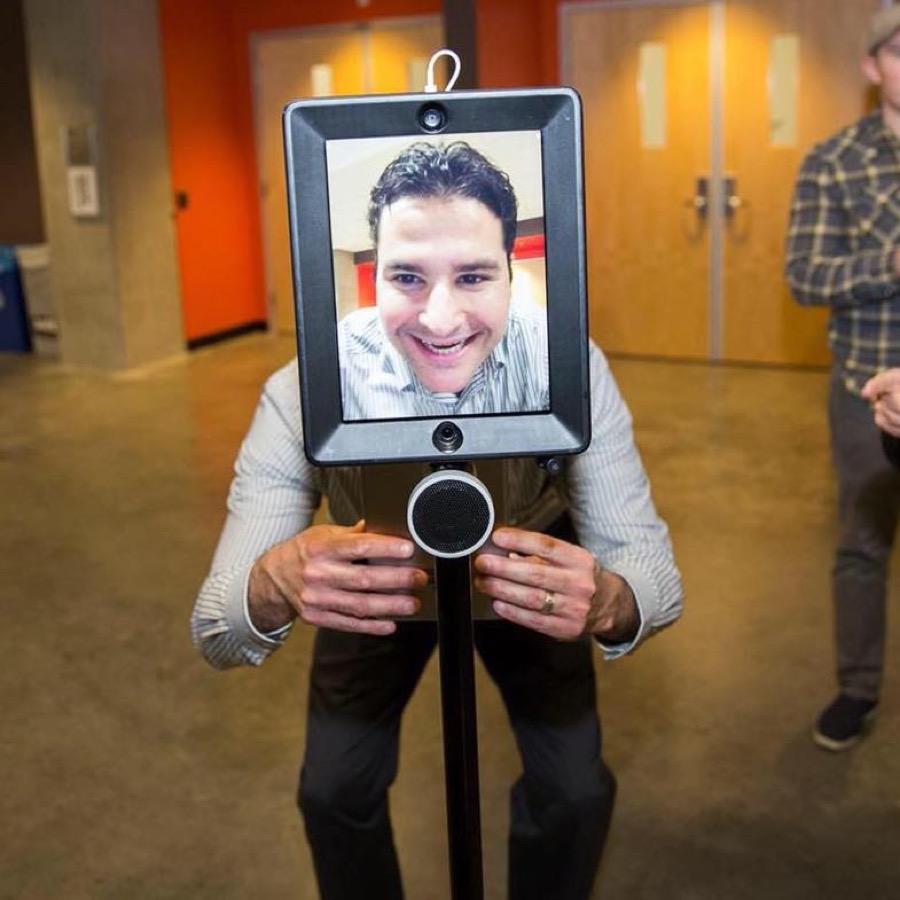
Christopher Campbell joined the ASU Cronkite School in August 2009, where he now serves as Systems Support Principal & Audio-Visual Manager.
The road there ran through a surprising range of hands-on work: granite surface plate calibration and resurfacing for aerospace clients in the family business, Campbell's Granite Surface Plate Service; CAD technician at AlliedSignal; Catholic music director for the Diocese of Phoenix; automotive technician at Lund Cadillac; diesel and hydraulics technician at Empire Southwest (CAT), Arizona's largest Caterpillar dealership; and audio-visual technician and working musician.
- Based inPhoenix, Arizona
- DegreeAAS, Mesa Community College
- Emailchris.campbell@asu.edu
- Phone(602) 496-5227
“In the realm of information technology, your integrity forms the bedrock of a secure and dependable digital landscape, exemplifying a commitment to ethical practices that fortify the foundations of technological trust.”
Résumé
Experience
Results-driven IT professional with more than 17 years in higher education information technology, seeking an IT Manager role to contribute technical expertise and leadership to organizational success.
-
Systems Support Principal
Walter Cronkite School of Journalism & Mass Communication
Jamf Pro systems support
- Manage 500+ Apple desktops, laptops, and mobile devices across three locations with Jamf Pro.
- Orchestrate macOS and iOS deployments, policies, patch management, and configuration profiles.
- Build and deploy Jamf packages with Bash and Python scripting.
Deployment workflows
- Developed Jamf pre-stage deployment workflows for classrooms, labs, and conference rooms.
- Implemented pre-stage workflows for staff and faculty offices, including mobile workstations.
- Introduced a DEPNotify workflow for clear, real-time deployment status.
IT administration & security
- Integrate new Apple devices into Jamf MDM through Apple School Manager.
- Manage server updates and remediate security vulnerabilities.
- Support macOS, Windows 10, and Windows 11 in an enterprise environment.
Support & maintenance
- Install, configure, maintain, and troubleshoot departmental workstations.
- Perform computer and mobile device hardware repairs.
- Coordinate with audio-visual vendors on critical repairs and upgrades.
Collaboration & leadership
- Lead audio-visual support for Cronkite events and mediated classrooms.
- Partner with university-wide Technology Support on campus-wide solutions.
- Canvas LMS admin and liaison for the Cronkite School, helping faculty build and design courses.
-
Systems Support Specialist
Walter Cronkite School of Journalism & Mass Communication
Configuration & deployment
- Configured and imaged staff, faculty, and classroom computers with macOS and Windows deployment tools.
- Set up email clients and public folders, and bound computers to ASU Active Directory.
- Installed, configured, and maintained Mac OS X, macOS, and Windows systems.
Technical support
- Provided computer and software support to staff, faculty, and students.
- Advised on purchasing and helped build audio-visual equipment upgrades.
- Troubleshot basic networking and TCP/IP connectivity issues.
Technology implementation
- Programmed and launched an 86″ multi-touch display running Sedna Touch.
- Managed software licensing and installation of common business applications.
- Maintained Active Directory: security groups, organizational units, and group policies.
Security & devices
- Removed malware and viruses for faculty, staff, and students.
- Recommended best practices for personal device protection.
- Supported iPads, iPhones, Android, and other mobile business devices.
Equipment & people
- Researched, recommended, and purchased IT equipment; managed inventory.
- Documented and tracked service calls with a web-based ticketing system.
- Recruited, hired, and mentored part-time student employees.
Certifications
Jamf Certifications
Jamf Pro administration at enterprise scale: deployment, policies, patching, and configuration across macOS and iOS.
jamf.com- 2013
Apple Certified Mac Technician
Diagnosing, servicing, and repairing Mac hardware and software, from system architecture to macOS installation.
apple.com - 2020
Extron AV
Fundamental AV technologies, Extron software, and product programming.
extron.com Biamp
Biamp's line of digital signal processors and software.
biamp.comAMX
AMX University training on AMX hardware and software.
amx.com
Education
AAS, Automotive Performance Technology
Mesa Community College
Diagnosing, servicing, testing, and repairing complex computer-controlled automotive electrical systems, plus engine performance, brakes, A/C, alignment, suspension and steering, transmissions, and power trains.
Skills
What I work with
- Customer service
- Technical troubleshooting
- Jamf Pro administration
- Audio-visual management
- Video editing
- LMS support








Services
Home & small-office tech help
The same care I bring to a university, for your home or small office.
-
Home network setup
Routers configured, Wi-Fi secured, and connectivity problems tracked down for a fast, reliable network.
-
Device setup
Computers, laptops, phones, and smart-home gadgets set up to work together without the headache.
-
Backup & recovery
Local and cloud backups that protect what matters, plus recovery when something goes wrong.
-
Software installs & updates
Apps installed and kept current with the latest features, fixes, and security patches.
-
Troubleshooting & support
Hardware and software problems diagnosed and fixed, with guidance to keep things healthy.
Testimonials
What colleagues say
-
I had the pleasure of working closely with Chris within the Cronkite IT department, and was continually impressed by his exceptional IT support skills. Chris consistently provides prompt and effective solutions to various technical issues, demonstrating a deep understanding and knowledge of IT management.
 Alvin BridgesInterim CIO, Mesa Community College
 -
Chris has always provided outstanding computer, network, and printer support. His quick and effective solutions keep our systems running smoothly. Chris stands out for his technical expertise, clear communication, and proactive approach to preventing issues. I highly recommend Chris for his invaluable support in maintaining our technology related issues.
 Leonard Downie Jr.Former Managing Editor, The Washington Post
 -
I had the pleasure of working with Chris in the Cronkite IT department. Chris' IT related knowledge and skillset is second to none. Chris will go out of his way to provide the best IT customer service as possible.
 Jeff WilliamsNetwork Security Engineer, Arizona State University
 -
As a former IT staff member, I can attest to Chris' exceptional skills and professionalism. His expertise and dedication to resolving technical challenges make them an invaluable asset to any team. I highly recommend Chris for his outstanding contributions to the CSIT department.
 Timothy EvansWorkstation Analyst, Michigan State University
Contact
Let's talk.
Please feel free to reach out if I can be of service.
-
Phone(602) 496-5227
-
Office555 N Central Ave, Suite 302
Phoenix, AZ 85004